WinFlash OBDII Program Updates
Version 4.81
If you are currently running version 4.00 or later of the WinFlash OBDII program, please download the following update program and save it to your Desktop:
Update for WinFlash OBDII version 4.00 and later
If you are currently running and earlier version of the WinFlash OBDII program, please uninstall the current version of the program and then download the following update program and save it to your Desktop:
Update for earlier versions for the WinFlash OBDII program
Then to install the update, double click on the downloaded file and follow the on-screen instructions..
By default the updates will be installed into the folder named c:\program files\cats\obd2tuner (or c:\program files (x86)\cats\obd2tuner) which is the default installation folder for the OBDII Tuner and WinFlash OBDII programs. If you installed these programs into another folder make sure you select the correct installation folder during the installation of the update.
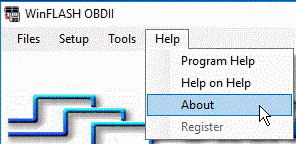
After installing the updates, run the WinFlash OBDII program. Click on the 'Help' menu and select 'About' from the drop-down list.
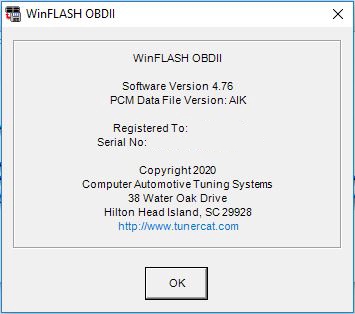
On the 'About' screen, verify that you are now running version 4.81 of the program.
NOTE:
This is an update only. You must have a previously installed version of the standard WinFlash OBDII program on your PC to use this update. If you are trying to update the Dealer version of the WinFlash OBDII program please go HERE.
Version History
Version 4.81
-
Added support for the 2015 - 2016 E80 ECM.
Version 4.80
-
Modified to skip the controller unlock process if the security seed is 0.
Version 4.79
-
Corrected check for the slave modules for the early E39.
Version 4.78
-
Fixed a bug in early E39 ECM test read function.
Version 4.77
-
Fixed a bug that could cause the programming process of the P08 PCM to fail (1997-2002 2.2/2.4L vehicles supported by the OBD2_36 Vehicle Definition File.
\ Version 4.76
-
Added support for the early E39 ECM (P/N 12651993) used in 2010 - 2011.
Version 4.75
- Added automatic security seed calculation for T87 TCM.
- Fixed a bug that could cause the read process to run slower than usual.
Version 4.74
- Modified UnLockPCM routine to try the normal unlock routine even if the security seed is 0. If the unlock request fails, reset error and proceed as if the ECM is already unlocked as normally indicated by a security seed of 0.
Version 4.73
- Fixed bug that would occasionally cause an error when programming the P08 PCMs (1997-2002 2.2/2.4L vehicles supported by the OBD2_36 Vehicle Definition File).
Version 4.72
- Fixed bug that would cause an incorrect security seed to be used by the PCM Receovery function when programming a TCM.
Version 4.71
- Reset the Force Full Program mode after PCM Recovery. Previously the Force Full Program mode would remain active after the PCM Receovery function was used until the WinFlash program was restarted.
Version 4.70
- Added option to Setup menu to disable high speed communications.
Version 4.68
-
Corrected a bug that would display the previously entered security seed on the Special Security Key screen.
Version 4.67
-
Corrected a bug in the unlock routine that would prevent the ECM from being unlocked for certain five-byte security key values.
Version 4.66
-
Corrected a bug in the read routine that would cause the VIN to be blank in the resulting cal file when reading a TCM only on the bench.
Version 4.65
-
Added support for the P11 PCM used in the 2003 - 2005 2.2L cars.
-
Corrected a bug in the programming routine for the P07 PCM used in the 2004 - 2005 Northstar 4.6L cars.
Version 4.64
-
Corrected a bug that would prevent a comm error message from being displayed.
Version 4.63
-
Correct bug that would cause the old VIN to be displayed in the Vehicle Information screen after programming a new VIN.
Version 4.62
-
The Vehicle Information screen now displays the VIN stored in the ECM and TCM separately in case they are different.
-
Corrected a bug that could cause the WinFlash OBDII program to halt if the read/program process did not complete properly.
Version 4.58
-
Added support for P05b and P05c PCMs and the T76 TCM.
Version 4.56
-
Added support for slave module programming for E39 & E39A ECMs.
Version 4.55
-
Added support for the 1997 - 2003 2.2L & 2.4L L4 vehicles using the 16228016, 12202203 and 9356249 PCMs.
Version 4.52
-
Added programming log file.
Version 4.51
-
Corrected a bug in the test read function that would cause the read process to fail for a few of the early OBDII ECMs.
Version 4.50
-
Corrected a bug that could cause problems when programming the 2018 E92B ECMs.
Version 4.48
-
Corrected vehicle information Save function to include all 6 T87 calibration modules.
Version 4.47
-
Corrected bug in vehicle information display.
Version 4.45
-
Added support for the 2007 P12B PCM.
Version 4.44
-
Corrected bug in the 2004 - 2006 P12 PCM programming routine.
Version 4.41
-
Added support for the 2004 - 2006 P12 PCM.
Version 4.38
-
All new build with full Windows 10 compatibility.
-
Added capability to reprogram the calibration slave modules for the CAN ECMs
-
Added support for the 2017 - 2018 E80A ECM.
Version 3.66
-
Added error trap for an invalid module part number.
Version 3.65
-
Corrected bug in CVN calculations.
Version 3.64
-
Corrected bug that would prevent a VIN change in E92B ECMs.
Version 3.63
-
Added support for 2019 vehicles.
Version 3.62
-
Added support for 2004 - 2006 hybrid trucks.
Version 3.61
-
Added support for E40 ECM.
Version 3.60
-
Added support for 2018 vehicles.
-
Added support for T87 TCM controller for the 8-speed transmission.
-
Corrected bug that would cause the ECM part number to be displayed incorrectly for some ECMs.
Version 3.56
-
Added support for special security keys.
-
Added support for the 2007 Hybrid trucks.
-
Corrected bug that would cause the vehicle information to be incorrect under certain conditions.
Version 3.54
-
Corrected bug that would cause the ECM part number to be displayed incorrectly for some ECMs.
Version 3.53
-
Revised vehicle information screen to include the hardware part number.
Version 3.52
-
Added support for handling 2017 security.
Version 3.51
-
Revised vehicle information screen to include traceability no. and security seed for ECM and TCM. Also added a save function.
Version 3.50
-
Updated to support 2017 VINs..
Version 3.49
-
Updated to properly detect incorrect security seed response from pre-CAN PCMs so that the special key entry screen would be displayed for these PCMs.
Version 3.48
-
Improved programming error recovery for the 1996 - 97 LT1 PCMs
-
Corrected a bug that prevented the calibration part number from being reprogrammed when a 1996 - 97 LT1 PCM was reprogrammed. (The actual calibration data was all programmed correctly).
Version 3.47
-
Added support for 2016 vehicles
-
Added support for E39 and E39A ECMs.
Version 3.44
-
Modified VIN Change function to allow VIN changes to the 2011 - 2015 heavy duty trucks with the L96 6.0L engine that used the E78 ECM.
Version 3.43
-
Modified VIN Change function to allow VIN changes to a stand-alone TCM.
Version 3.42
-
Corrected a bug that was introduced in version 3.14 that would prevent proper programming on the E92 ECM used in the 2014 - 2015 trucks and Corvette.
Version 3.41
-
Added support for 2011 - 2015 GM Heavy-duty Trucks with the L96 6.0L Engine (E78 ECM).
Version 3.34
- Added support for 2015 Chevy/GMC SUVs.
Version 3.33
- Added support for E92 ECM used in 2014 trucks and Corvette.
- Expanded the vehicle identification function to include vehicles up through 2014
- If the ECM is locked you now have the option of entering a special key to unlock it.
Version 3.31
- Added VIN change function for E37 ECMs.
- Expanded the vehicle identification function to include vehicles up through 2013.
- Added error message if the program can not locate the OBDII Interface.
- Improved communication error logging.
Version 3.26
- Added VIN change function for E67 ECMs..
Version 3.27
- Improved ECM recovery function.
Version 3.26
- Added improved communications logging capabilities for easier debugging.
Version 3.25
-
Improved CAN programming error recovery.
- The Force Full Program option is now disabled each time the program starts up to prevent unintentional full programming when it's not needed. Previously if the Force Full Program option was selected it would remain active until the user disabled it.
Version 3.24
- Added feature to allow access to locked ECMs if the security key is known..
Version 3.23
- Important update to the programming process to eliminate possible problems when programming the ECM for 2012 vehicles using the E38 ECM.
Version 3.22
- Corrected a bug that would cause a run time error when logging communications in Test mode.
Version 3.21
- Added support for the 2007 and newer CAN bus vehicles.
- Added option to allow user to select whether DTCs are cleared after reprogramming.
Version 2.25
-
Corrected a bug that would prevent the changing of the VIN in the 2002 - 2005 L6 Trailblazer, Envoy and Bravada vehicles.
Version 2.24
-
Added support for the 2002 - 2005 L6 Trailblazer, Envoy and Bravada
Version 2.21
-
Improved programming process for 2004 - 2005 V6 cars.
-
Added option to skip VIN verification when reprogramming the VIN
-
Corrected VIN reprogramming process to support V6 cars.
Version 2.18
-
Added support for reading and programming the 1996 V6 cars.
Version 2.17
-
Modified to work properly with the 2003 V6 cars using the newer (12583827) PCM
Version 2.16
-
Added support for 2002 - 2003 GM V6 cars.
-
Improved error handling
Version 2.13
-
Support for GM V6 cars
-
Added a PCM Recovery function to recover a PCM after a failed programming session.
-
Improved PCM read error recovery.
-
Added support for early LS1 ASA racing calibrations.
-
Corrected a bug that could cause a Runtime Error 6.
Version 2.03
-
Improved PCM communications.
-
In-field OBDII interface unit firmware updates now supported.
-
Corrected program to properly identify ‘96/97 LT1 Buick Roadmaster
-
On-line program help now available.
-
Corrected a problem that would sometimes require the ‘96/97 LT1 PCMs to be reset by disconnecting the battery after reading the PCM.
-
Corrected a bug in the programming routine that would prevent successful programming of the Vortec truck VCMs if the calibration file being used to program the VCM contained a different operating system than the operating system that was currently in the VCM. This bug was introduced in version 1.88 of the WinFlash OBDII program.
-
Corrected program to properly identify ‘96/97 LT1 Impalas
-
Program now provides support for a ‘96/97 LT1 PCMs with an invalid VIN.
-
Added support for the ‘97/98 Corvette/Camaro LS1.
-
WinFlash now correctly identifies the Impala and LT4 and Cadillac Fleetwood LT1.
-
The Change VIN function now works correctly for the LT1/LT4 vehicles
-
The OBDII Tuner program will no longer request a password when opening a '97 LT1 cal file.
-
Corrected the bias values for the main spark and coolant temp compensation spark tables. Previously the displayed values were incorrect.
-
Added additional error checking
-
Modified communications to ensure that reading and programming of '97 Vortec Truck VCMs run in high speed mode.
Please report any problems or bugs to tc@tunercat.com.