OBDII Tuner Updates
To install the update, double click on the downloaded file and follow the on screen instructions.
The default install folder is c:\program files\cats\obd2tuner which is the default installation folder for the OBDII Tuner program. If you installed the OBDII Tuner program into another folder make sure you change the installation folder for the update accordingly.
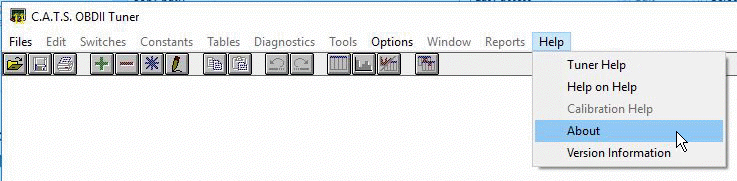
After installing the updates, run the OBDII Tuner program. Click on the 'Help' menu and select 'About' from the drop-down list.
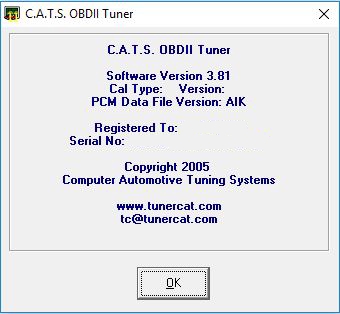
On the 'About' screen, verify that you are now running version 3.83 of the program.
NOTE:
This is an update only. You must have a previously installed version of the OBDII Tuner program on your PC to use this update.
Version History
Version 3.83
-
Added support for E80 calibrations.
Version 3.82
-
Corrected bug in .bin to .cal file conversion for early E39 calibrations.
-
Added error trap to check for invalid mod 7 & 8 part numbers.
Version 3.81
-
Added support for the early E39 ECM (P/N 12651993) used in 2010 - 2011.
Version 3.79
-
Corrected bug that would prevent the correct conversion of 2002 - 2005 Trailblazer calibration files.
Version 3.78
-
Added support for the P11 PCM used in the 2003 - 2005 2.2L cars.
Version 3.77
-
Corrected bug that would cause the checksum to be incorrectly updated after changes to the P05b ECM calibration files (OBD2_38 Vehicle Definition File).
Version 3.76
-
Re-enabled mouse wheel.
Version 3.75
-
Added support for P05b and P05c PCMs and the T76 TCM.
Version 3.74
-
Corrected bug in the VIN extraction when opening binary format E40 calibration file.
Version 3.73
-
Corrected checksum calculation for 1997 - 2003 2.2L & 2.4L L4 calibration files.
Version 3.72
-
Corrected bug that would cause a Run-time error 6 (Overflow) when opening a table on a very large / high resolution monitor.
Version 3.71
-
Added support for the 1997 - 2003 2.2L & 2.4L L4 vehicles using the 16228016, 12202203 and 9356249 PCMs.
Version 3.70
-
Corrected bug that would cause a Run-time error 6 (Overflow) when opening a table on a very large monitor.
Version 3.67
-
Added ability to open a P12B ECM calibration file in binary file format.
Version 3.66
-
Added ability to change the slave module part numbers on the calibration information screen.
Version 3.65
-
Corrected engine description for 2013 - 2019 Encore/Trax 4 cyl trucks.
Version 3.64
-
Corrected calibration information screen and module import function ot support newer definition files.
Version 3.63
-
Added support for 2007 P12B PCM.
Version 3.62
-
Added support for 2004 - 2006 P12 PCM.
Version 3.61
-
Fixed bug that prevented the program from locating the code patch files.
Version 3.60
-
Added support for 2017 - 2018 E80A ECM.
Version 3.55
-
Corrected module labels on Calibration Information screen for T42 TCM.
Version 3.54
-
Added support for 2019 vehicles.
Version 3.53
-
Added support for 2004 - 2006 hybrid trucks.
-
Corrected bug that would prevent 1998 - 2000 Vortec truck binary format calibration files from loading correctly.
Version 3.52
-
Corrected bug that would prevent the display of the E40 diagnostics.
Version 3.51
-
Added support for the E40 ECM.
Version 3.50
-
Added support to load T87 calibration files in binary format..
Version 3.49
-
Added support for 2018 vehicles.
Version 3.48
-
Added support for 2017 vehicles.
Version 3.46
-
Corrected a bug that would prevent code patch files from being applied or removed correctly if more than one code patch file were present for that operating system.
Version 3.45
-
Added support for 2016 vehicles.
-
Added support for E39 and E39A ECMs
Version 3.44
-
Corrected Calibration Module Import function for E78 and E92 calibration files.
-
Corrected Calibration Information screen for E78 and E92 calibration files.
Version 3.42
-
Corrected a bug that would cause a run time error when using the Calibration Module Import function with T42 and T43 TCM calibration files.
Version 3.41
-
Added support for 2011 - 2015 GM Heavy-duty Trucks with the L96 6.0L Engine (E78 ECM).
Version 3.37
-
Corrected a bug in the binary to cal file conversion process that could cause the program to identify the vehicle incorrectly.
Version 3.36
-
Added support for 2015 Chevy/GMC SUVs.
Version 3.35
-
Added support for E92 ECM used in 2014 trucks and Corvette.
-
Expanded the vehicle identification function to include vehicles up through 2014.
Version 3.31
- Expanded the vehicle identification function to include vehicles up through 2013.
- Add check for valid rear end ratio entry on the Speed Calibration screen.
- Displayed accuracy of some tables has been improved.
Version 3.28
- Corrected bug that would apply an offset to small values in the volumetric efficiency coefficient tables.
Version 3.27
- Added support for the 2010 - 2013 cars and the 2008 - 2012 trucks using the E67 ECM.
Version 3.26
- Corrected a bug that could cause a value to change unintentionally due to rounding errors.
Version 3.25
- Not released.
Version 3.24
- Added support for the 2007 - 2009 cars using E67 ECM
Version 3.23
- Not released.
Version 3.22
- Added support for the 2006 - 2008 Corvettes and 2008 - 2009 Pontiac G8.
Version 3.21
- Corrected a bug that could cause a run-time error if a large value is added to or subtracted from a table value.
Version 3.20
- Added capability to open binary (.bin) format calibration files for the newer CAN bus vehicles.
- Corrected a bug that could cause calibration changes not to be saved under certain conditions when multiple tables were open.
Version 3.18
- Added support for the 2007 and newer CAN bus vehicles.
- Program modified to significantly reduce PC memory requirements.
Version 2.17
- Added support for the 2002 - 2005 L6 Trailblazer, Envoy and Bravada.
- Added code patch function.
- Fixed a bug in the compare function when comparing diagnostic action codes.
- Fixed a bug that could cause a runtime error when using the Calibration Calculator.
Version 2.14
- Added mouse wheel support.
- Added test for valid speed calibration information to prevent possible runtime error.
- Switch and constant tables are now loaded at the maximum possible size to minimize scrolling
- Fixed a bug that could cause a runtime error 70 when two instances of the OBDII Tuner are running.
Version 2.09
- Added support for 1996 V6 cars.
- Added support for other decimal separators for foreign users.
- Fixed a bug that could cause a runtime error 6 when using the speedometer calibration function for LT1 cars.
Version 2.04
- Corrected a bug that would cause a run-time error when using the speedometer calibration function when no tables are open.
Version 2.03
- Corrected a bug that would sometimes cause the Calibration Difference reports to falsely report differences in calibration parameters when there were none.
Version 2.02
- Added calibration module import function that allows you to import entire modules from one calibration into another.
- Added the table export/import function that allows you to export table values to a file and then import those values into another table or calibration.
- Added a Reports menu with new reporting functions including a calibration difference summary report and a difference detail report for comparing calibrations.
- The speed calibration function for the LT1 cars has been improved and now includes the speed error method and the automatic updating of the transmission tables.
- Added checksum verification when you open a calibration file. A warning message is displayed if any incorrect checksums are found.
- Added command line support so you can associate .cal file with the program and automatically start the OBDII Tuner by double clicking on a .cal file.
- Added support for using a ',' as the decimal separator for European users.
- The OBDII Tuner program now supports 32-bit calibration values.
Version 1.56
- Increased maximum allowable table size.
- Improved VIN parse function
- Corrected error in speedometer calibration function for '97/98 LS1's that could cause a runtime error under certain conditions.
Version 1.53
- Improved speedometer calibration function to better handle the LS1 Corvettes.
Version 1.52
- Improved support for the 1996 - 97 LT1 diagnostic error codes.
Version 1.51
- Added support for the GM V6 cars.
- Added support for newer model years to the VIN information screen.
- Added support for the early ASA racing calibrations.
- Corrected a bug in the binary to cal file format conversion routine.
- Correct a bug that could cause a Runtime Error 348 when multiple tables were open and they were minimized and then restored.
- Corrected an error in the recommended injector size calculation on the Calibration Calculator screen.
Version 1.40
- Corrected a bug that could cause you to lose change made to the calibration notes from the Calibration Information screen when you select 'Save As' from the 'Files' menu to save the file under a new name.
- Correct a bug in the speed calibration that could cause errors when entering a tire size.
Version 1.38
- Speed calibration function now works for '97/98 LS1 cars.
- Improved speed calibration accuracy when entering tire size.
- Program now correctly identifies 8.1L motor home VINs.
- Fixed a bug that would result in a runtime error when exiting the program when multiple instances of the program were running.
- Corrected the VIN verification to prevent a runtime error is an invalid character were entered into the VIN.
Version 1.34
- Program can now open binary calibration files in both Motorola format (MSB/LSB) and Intel format (LSB/MSB)
- Calibration notes can now be entered and edited from the file Save As screen.
- Corrected a bug that could result in a runtime error when entering a new VIN in the Calibration Information screen.
Version 1.32
- Corrected a bug that would disable the speed calibration function for LT1 calibration files.
Version 1.29
- Corrected a bug that would prevent the opening of a compare file when work with 8.1L truck calibrations.
Version 1.28
- Improved process of opening a binary (.bin) format calibration file.
- Program on-line help now functioning
- Added table editing short cut keys. The following short cut keys are now active when a table is displayed:
F10 or Cntl-F10 will display the edit menu otherwise accessed by a mouse right click
F3 will increase the selected value(s) by 10 times the normal step size
F4 will decrease the selected value(s) by 10 times the normal step size
F5 will increase the selected value(s) by 50 times the normal step size
F6 will decrease the selected value(s) by 50 times the normal step size
-
Calibration information screen will now warn you of an invalid VIN but will allow you to accept it as is if you want.
-
Added validity check for .ini file data to prevent a runtime error if any data are invalid
- Corrected error that prevented the table import function from working.
Version 1.25
- Added support for '97/98 Corvette/Camaro LS1 vehicles
- The Calibration Calculator can now be left open while viewing and editing tables
- Added support for '96/97 Corvette/Camaro/Impala LT1 vehicles
- Corrected a bug that would sometimes cause a runtime error when using the Print All function.
- Corrected bug the would prevent opening an LT1 compare file or Import File.
- Corrected a bug that could cause a runtime error when comparing files
- Corrected a bug that would cause incorrect values to be displayed in compare mode for some table
Please report any problems or bugs to tc@tunercat.com.